
Balancing Strategies#
The GBT IF system has many ways to add gain and/or attenuation in the IF path, depending upon the desired configuration. Before taking data with the GBT, you must ensure that all components along the IF path have optimum input power levels. This process is referred to as balancing.
Balancing ensures for example that no components saturate and that amplifiers are in the most
linear part of their dynamic range. The system automatically adjusts power levels to optimum
values when you issue the Balance() command in AstrID. The
following discussion gives guidelines for when and how often to use the Balance()
command.
Strategies for balancing the IF power levels depend upon the backend, the observing frequency, the observing tactics, the weather and the objects being observed. The DCR has a dynamic range of about 10 (from about 0.5 to 5 Volts of IF power in the IF rack) in its ability to handle changes in the brightness of the sky as seen by the GBT. The sky brightness can change because of continuum emission of a source or a maser line as you move on and off the source. It can also change due to changes in the atmosphere’s contribution to the system temperature as the elevation of the observations change or due to the weather.
Whenever you Balance() you almost always change the variable
attenuator. Each attenuator setting has a unique bandpass shape. So if you change attenuators
then you will likely see changes in the bandpasses and baseline of the raw data.
There are not any set–in–stone rules for when you should balance the GBT IF system. However there are some guidelines which will allow you to determine when you should balance the IF system:
You should balance the IF system after performing a configuration (i.e. after executing
Configure()).You should minimize the number of times you balance when observing.
-
If you know \(T_{sys} + T_{src}\) will change by more than a factor of two (3 dB) when you change sources (not between and on and off observation) you should consider balancing.
Note
A change in power from \(P_1\) to \(P_2\) can be represented in dB by \(10 \log_{10} \left(\frac{P_1}{P_2}\right)\)
Try to avoid balancing while making maps.
Never balance between “signal” and “reference” observations (such as during an on/off observation).
If you are observing target sources and calibration sources then try not to balance between observations of the targets and calibrators.
Note
If during your observing you expect to see a change in power levels on the sky that are roughly equivalent to the GBT system temperature, then you should contact your GBT project friend to discuss balancing strategies. There are no global solutions and each specific case must be treated independently.
If the system temperature between “signal” and “reference” observations differ by a factor of two or more,
BalanceOnOff()should be used in place ofBalance(). This will balance the IF power levels at the midpoint of the two power levels at each sky position.
Balancing VEGAS#
There are two aspects to VEGAS balancing that will produce separate error messages, so you should check the origin carefully:
-
- Adjusting IF power levels upstream of the VEGAS ADC
-
Power levels upstream of the VEGAS ADC are balanced so that the power going into an ADC is at an acceptable level.
-
- Balancing will fail if the input IF power levels to VEGAS is more than :math:`pm`2dB from the target value of -20 dBFS
-
VEGAS has a much higher range than that, but it is extremely rare that the observation/equipment combination should prevent the balancing algorithm from meeting the target. A conservative limit was chosen since a failure normally means that some part of the system is not configured correctly, or that there is hardware failure. If an IF balancing failure occurs, the user (or operator) should look for errors in the IF system and can view the actual IF power levels in the VEGAS CLEO screen (see Monitoring VEGAS observations). If the power levels are significantly different from -20 dBFS, there is a problem somewhere in the IF chain.
-
- If the power levels are different from -20 dBFS, but close to it, there may not be a real problem.
-
In some cases, the IF balancing will fail due to an exceptional, but acceptable circumstance; for example, looking at an extremely bright source, or using a spectral window close to the edge of the receiver passband. The IF balancing failure does not cause an abort, and it is often acceptable to continue observing under these circumstances.
The useable dynamic range of VEGAS is actually >20 dB. It is set at a low level by quantization effects, and at high levels by saturation. If the IF power level looks reasonable, the next check is to look at the ADC histogram counts using the VEGAS Data Monitor (VEGASDM).
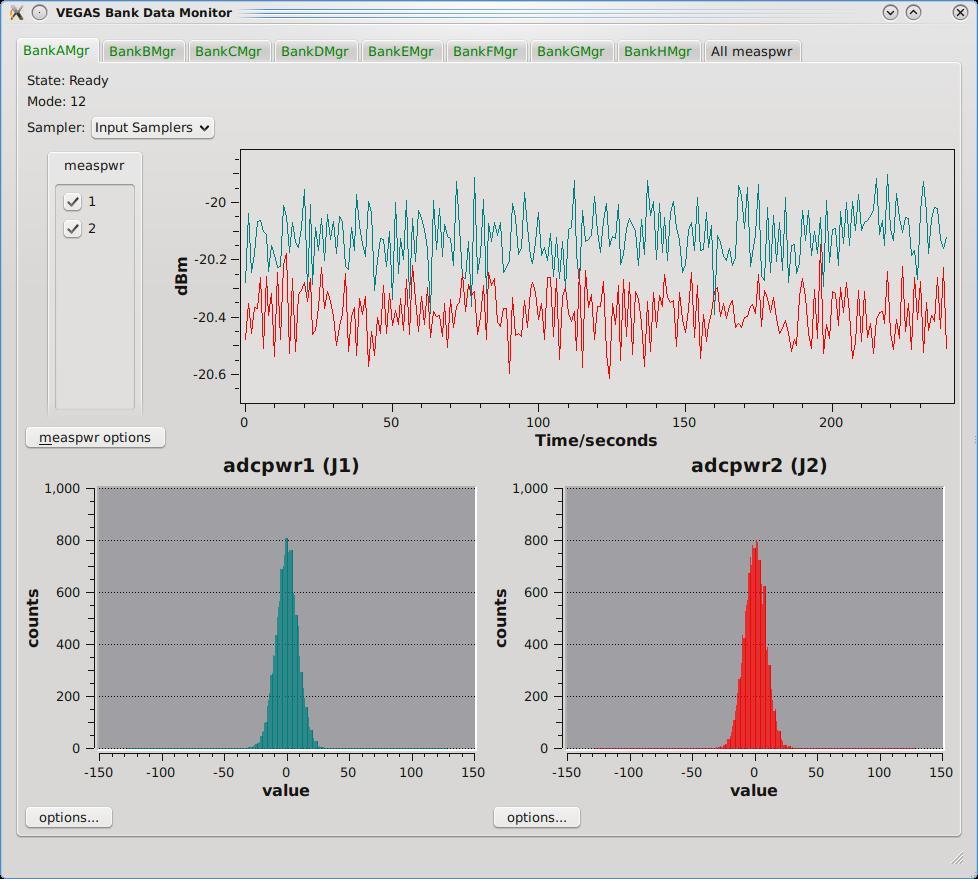
As long as the histogram looks like a Gaussian distribution, with a a FWHM around 20 counts or larger, but with no counts approaching \(\pm\) 127, then the IF level into VEGAS is acceptable. Make sure you monitor the ADC histogram through all phases of your observation (e.g. switching on and off a bright source).
-
-
Adjusting the “digital gain” inside the VEGAS processing firmware There should be no circumstances (e.g. an FFT overflow) which result in lost precision.
-
- The digital gain should never fail to balance.
-
It is a property of the firmware design of each mode, not the IF input. A failure of the digital gain balancing indicates a serious problem, and engineering support should be called.
-