
Catalogs#
The Source Catalog system in AstrID provides a convenient way for the user to specify a list of sourcesto be observed, as well as a way to refer to standard catalogs of objects. At a minimum for each source there must be a name and a location (RA/Dec or Glat/Glon, etc). Other parameters may be set, such as radial velocity. An example of a simple Catalog is:
# My source list
format=spherical
coordmode=J2000
HEAD = NAME   RA        DEC
Object1  09:56:16.98  +49:16:25.5
Object2  10:56:16.98  +50:16:25.5
Object3  11:56:16.98  +51:16:25.5
Object4  12:56:16.98  +52:16:25.5
There are three formats of catalogs:
SPHERICAL: a fixed position in one of our standard coordinate systems, e.g. RA/Dec, Az/El, Glon/Glat, etc.
EPHEMERIS: a table of positions for moving sources (comets, asteroids, satellites, etc)
NNTLE NASA/NORAD: Two-line element sets for Earth satellites.
In addition, the following solar system bodies may be referred to by name, i.e. no
catalog needs to be invoked for the system to understand these names: 'Sun',
'Moon', 'Mercury', 'Venus', 'Mars', 'Jupiter', 'Saturn',
'Uranus', 'Neptune', and 'Pluto'. These names are case-insensitive and
may be given to any Scan Type function.
To use the catalog system, you invoke the Catalog()
command within SBs and pass names of the desired objects to any of the
scan functions.
All sources named in all the catalogs that have been invoked are available within an
SB. If the same name appears in two or more catalogs, the name from the most recently
invoked catalog will prevail. Name comparisons are case-insensitive, hence “b2322+16”
“B2322+16” are equivalent.
Getting a Catalog into AstrID#
Although one can include any number of Catalogs in an SB, the standard
practice is to put all the Catalogs into separate files that are then brought
into the SB via multiple calls to the Catalog()
command. This:
keeps SBs simple and without clutter
allows changes to be made to a Catalog without having to validate and re-save the SB
The best way to learn about how to bring Catalogs into an SB is through an example. Let’s suppose that there are two Catalogs that you need for your observations. These two catalogs are in the following files:
/home/astro-util/projects/GBTog/cats/sources.cat/home/astro-util/projects/GBTog/cats/pointing.cat
These catalogs may be loaded into the SB as shown in the following example:
#first load the catalog with the flux calibrators
cata=Catalog('/home/astro-util/projects/GBTog/cats/sources.cat')

#now load the catalog with the pointing source list
catb=Catalog('/home/astro-util/projects/GBTog/cats/pointing.cat')

#Objects defined in loaded catalogs may now be used in scan functions
#Object1 is in source.cat and 0006-0004 is in pointing.cat
Track('Object1',None, 60)
Slew('0006-0004')
All sources from all catalogs are available and referenced by name within the scope of the SB, with the exception that for duplicate source names only the last entry of that name will be recognized. After loading a Catalog any scan function may be run by giving it the source name as shown above.
Catalog Format#
A Catalog typically has two sections: a header section followed by a table of information
for all the sources. The header section consists of KEYWORD = VALUE pairs.
The KEYWORD = VALUE pairs tell the SB interpreter how to read the information in the
table section of the Catalog. Once a keyword value is given, its value will persist until
re-set or the end of the Catalog is reached. The keywords are case-insensitive. The
values for a keyword must not contain any embedded blanks (except source names in NNTLE format).
A Catalog can contain comments with the beginning of a comment being denoted by the hash symbol,
#. All information on a line after the hash symbol is considered to be part of the comment.
After the header, each source in the Catalog occupies a single line. You should not use the hash
symbol in source names.
Catalog Header Keywords#
Catalog Header Keywords are used to define how the catalog entries should be read. The keywords and their values are case insensitive. The example shown below will be used to describe some of the Catalog Header Keywords:
# My source list
format=spherical
HEAD = NAME COORDMODE   RA  DEC        RESTFREQ   VELDEF     VEL  type
Object1  J2000  09:56:16.9  +49:16:25  1420.405  VRAD-LSR   -25.3  HII
Src_A    J2000  10:56:16.9  +50:16:25  1665.401  VOPT-BAR   100.9  Gal
Unless mentioned otherwise, the following keywords should be listed as column headings
under HEAD:
HEAD#
This gives the header for tabular data, and consists of a list of any keywords. This should
appear as the last line in the header before lines giving information about the sources in
the catalog. The default header is HEAD = NAME RA DEC VELOCITY. In the above example
we have added more entries than the default. We have also created a new keyword named
type.
NAME#
The source name is any string up to 32 characters long. The name should not contain any embedded blanks or hashes.
COORDMODE#
The default is J2000. Possible values are:
J2000
B1950
JMEAN (mean coordinate of date given by EQUINOX)
GAPPT (geocentric apparent coordinates of date)
GALACTIC
HADEC
AZEL
ENCODER
In the above example we put the COORDMODE keyword in the HEAD line since we have sources
whose positions are given in different coordinate modes (J2000 and B1950). This keyword may be
given as either a header keyword or columnn heading under HEAD.
VEL or VELOCITY#
The radial velocity in km/sec. The Default is to use any previous setting or 0.0 if there is none.
VELDEF#
Velocity definition in the FITS convention, e.g. VOPT-BAR, VRAD-LSR, etc.
(see https://safe.nrao.edu/wiki/bin/view/GB/Data/VelDefFits).
Todo
Move the content of the wiki page to the Explanation section in GBTdocs.
The default is the velocity definition or reference frame that was previously set. In the a
bove example we put the VELDEF keyword in the HEAD line since we have sources whose
velocity definitions are different. This keyword may be given as either a header keyword or
columnn heading under HEAD. This value will also override the velocity definition in the
configuration.
RESTFREQ#
The rest frequency, in MHz. The default is to use the previous setting. Again we put the
RESTFREQ keyword in the HEAD line since we are defining two different spectral line
rest frequencies for each source. Note that this is an “expert” keyword as one has to be
aware of any conflicts with the hardware configuration. This keyword may be given as either
a header keyword or columnn heading under HEAD.
RA, HA, DEC, AZ, EL, GLON, GLAT#
A pair of coordinates must be given: RA/DEC, HA/DEC, AZ/EL, or GLON/GLAT. Angle formats may
be either in sexagesimal with colons (e.g. dd:mm:ss.ss) or in decimal format. RA and HA
are always in hours regardless of decimal or sexagesimal notation, while all other coordinates
use degrees of arc in both formats.
EQUINOX#
Used if the Coordmode is JMEAN. The value is a float (e.g. 2006 December 1, 12:00 UT
would be 2006.919178082192). This keyword may be given as either a header keyword or columnn
heading under HEAD.
# My source list
format=spherical
coordmode=jmean
equinox=2007.123456
HEAD = NAME     RA        DEC
Object2  10:56:16.98  +50:16:25.5
DATE#
For use in the EPHEMERIS format only. The UTC date, either 2005-06-23 or 2005-Jun-23
form. This keyword may be given as either a header keyword or columnn heading under HEAD.
UTC#
For use in the EPHEMERIS format only. The UTC time in the form hh:mm:ss.
DRA, DHA, DDEC, DAZ, DEL, DLON, DLAT#
For use in the EPHEMERIS format only. The coordinate rate keywords given in arcsec per hour.
DVEL#
For use in the EPHEMERIS format only. The radial velocity rate in km/s/hour.
FILE#
For use in NNTLE format only. This keyword value may refer to a file or a URL containing
a 2-line element set. This keyword may not be listed as a column name under HEAD.
USERADVEL#
For use in the NNTLE format only. If this is set to 1, then the radial velocity tracking
will be performed. Otherwise, if this is set to 0 or is missing then radial velocity
tracking will not be performed. This keyword may not be listed as a column name under
HEAD.
Ephemeris Catalogs#
A Catalog can also be used as an Ephemeris for the position of a moving object, such as a
comet or asteroid. To make the Catalog into an Ephemeris the first non-comment line of the
Catalog must contain FORMAT = EPHEMERIS.
The header of the Catalog for an Ephemeris can also contain the NAME, COORDMODE,
VELDEF and HEAD keywords. The “data lines” in the Catalog must contain at least
the date, the time, and a pair of coordinates for an Ephemeris. Optional parameters are
coordinate rates, radial velocity and radial velocity rate. User-defined parameters may
also be added.
The dates and times are required to be in UTC. The dates and times can be specified in any legal python form, for example:
YYYY-MM-DD hh:mm:sswhere MM is month number (e.g August = 09)YYYY-MMM-DD hh:mm:sswhere MMM is the abbreviated month name such as Jan, Feb, etc.
The ephemeris table should contain enough entries to cover a period longer than that required by a particular observing session with sufficient time resolution for the expected motion with respect to the telescope’s beam size. The observing system selects the portion of the table needed for the current scan start time and duration.
Instructions for getting ephemeris from JPL#
Tracking a comet which does not track at the sidereal rate will require the use of an external file generated from the NASA JPL Horizons website which holds a database of all the orbital parameters of all major and minor bodies in the solar system. First you must download the ephemeris file for your object of interest from the website: https://ssd.jpl.nasa.gov/horizons/app.html. Then you will have to convert the file into the CATALOG format for AstrID.
When you go to https://ssd.jpl.nasa.gov/horizons/app.html you should see something like this:
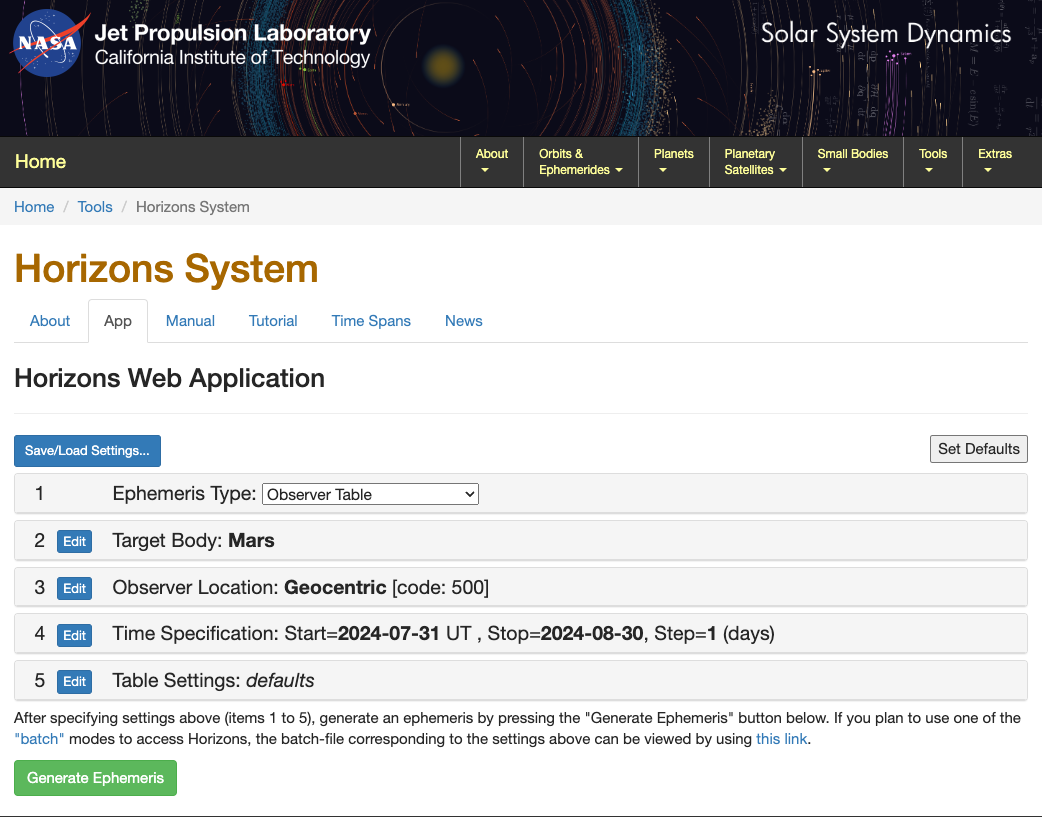
Your entries should be:
Ephemeris Type: Observer Table
-
- Target Body: SELECT YOUR OBJECT.
-
Clicking on the blue
Editbutton will open a form to search for the object of interest.
-
- Observer Location: Green Bank (GBT) [-9] (radar) (\(280^{\circ}\,09^{\prime}\, 36.7^{\prime\prime}\) E \(38^{\circ} 25^{\prime} 59.1^{\prime\prime}\) N, 873.10m).
-
To set the location to Green Bank, first click
Edit, then type`9in the search bar and pressSearch; the correct location should now appear.
-
- Time Specification: CHOOSE YOUR RANGE.
-
The ephemeris table should contain enough entries to cover a period longer than that required by a particular observing session. The observing system selects the portion of the table needed for the current scan start time and duration. If the position of the comet is changing rapidly, you should select a “step” range of 5 mins or shorter. If the comet is further out in the solar system and is not moving as rapidly with respect to the sidereal rate, a “step” range of 10-15 mins may be adequate to track” the comet. Consult your GBT project friend if you are unsure of the step range you should choose.
-
- Table Settings: QUANTITIES=1,3,20.
-
Fig. 24 shows the quantities that should be selected through the web interface to properly generate an ephemeris for tracking a comet.
Note
The dates and times are required to be in UTC. The dates and times can be specified in any legal python form, for example:
YYYY-MM-DD hh:mm:sswhere MM is month number (e.g August = 09)YYYY-MMM-DD hh:mm:sswhere MMM is the abbreviated month name such as Jan, Feb, etc.
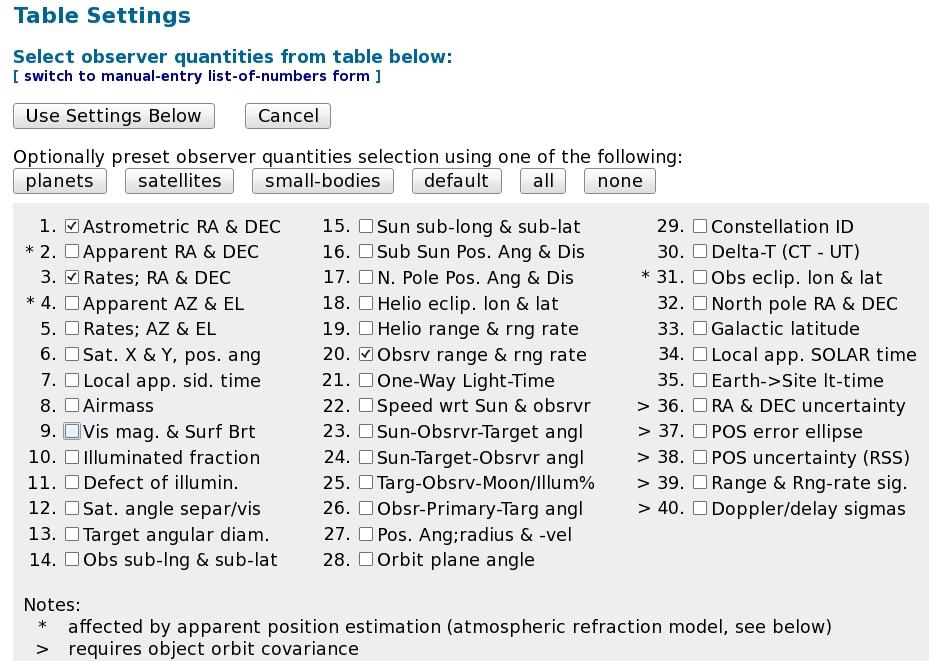
Fig. 24 Selecting quantities to generate an ephemeris.#
After clicking Generate Ephemeris, you should save the file to a directory in your area
in Green Bank. The ephemeris file will begin with a large amount of header information followed
by lines containing the date, time and pairs of coordinates as shown here:
*******************************************************************************
JPL/HORIZONS                   103P/Hartley 2              2016-Apr-05 07:53:21
Rec #:900870 (+COV)   Soln.date: 2014-Nov-10_13:49:39   # obs: 6506 (1986-2013)

FK5/J2000.0 helio. ecliptic osc. elements (au, days, deg., period=Julian yrs):

  EPOCH=  2456981.5 ! 2014-Nov-20.0000000 (TDB)    RMSW= n.a.
   EC= .6937804720128784   QR= 1.064195154203179   TP= 2457863.8230300969
   OM= 219.7487450736021   W= 181.3222857728302    IN= 13.6042724340803
   A= 3.475268743304754    MA= 225.7701522441      ADIST= 5.886342332406328
   PER= 6.4787437937458    N= .152132314           ANGMOM= .023095142
   DAN= 5.88279            DDN= 1.06431            L= 41.0339546
   B= -.310996             MOID= .0720049          TP= 2017-Apr-20.3230300969

Comet physical (GM= km^3/s^2; RAD= km):
   GM= n.a.                RAD= .800
   M1=  14.7     M2=  n.a.     k1=  8.     k2= n.a.     PHCOF= n.a.

COMET comments
1: soln ref.= JPL#252, data arc: 1986-03-15 to 2013-05-14
2: k1=8.;
*******************************************************************************


*******************************************************************************
Ephemeris / WWW_USER Tue Apr  5 07:53:22 2016 Pasadena, USA      / Horizons
*******************************************************************************
Target body name: 103P/Hartley 2                  {source: JPL#252}
Center body name: Earth (399)                     {source: DE431}
Center-site name: Green Bank (GBT)
*******************************************************************************
Start time      : A.D. 2016-Apr-05 00:00:00.0000 UT
Stop  time      : A.D. 2016-Apr-06 00:00:00.0000 UT
Step-size       : 5 minutes
*******************************************************************************
Target pole/equ : No model available
Target radii    : 0.8 km
Center geodetic : 280.160200,38.4330940,0.8760930 {E-lon(deg),Lat(deg),Alt(km)}
Center cylindric: 280.160200,5003.37558,3943.7589 {E-lon(deg),Dxy(km),Dz(km)}
Center pole/equ : High-precision EOP model        {East-longitude +}
Center radii    : 6378.1 x 6378.1 x 6356.8 km     {Equator, meridian, pole}
Target primary  : Sun
Vis. interferer : MOON (R_eq= 1737.400) km        {source: DE431}
Rel. light bend : Sun, EARTH                      {source: DE431}
Rel. lght bnd GM: 1.3271E+11, 3.9860E+05 km^3/s^2
Small-body perts: Yes                             {source: SB431-BIG16}
Atmos refraction: NO (AIRLESS)
RA format       : HMS
Time format     : CAL
RTS-only print  : NO
EOP file        : eop.160404.p160626
EOP coverage    : DATA-BASED 1962-JAN-20 TO 2016-APR-04. PREDICTS-> 2016-JUN-25
Units conversion: 1 au= 149597870.700 km, c= 299792.458 km/s, 1 day= 86400.0 s
Table cut-offs 1: Elevation (-90.0deg=NO ),Airmass (>38.000=NO), Daylight (NO )
Table cut-offs 2: Solar Elongation (  0.0,180.0=NO ),Local Hour Angle( 0.0=NO )
*******************************************************************************
Initial FK5/J2000.0 heliocentric ecliptic osculating elements (au, days, deg.):
  EPOCH=  2456981.5 ! 2014-Nov-20.0000000 (TDB)    RMSW= n.a.
   EC= .6937804720128784   QR= 1.064195154203179   TP= 2457863.8230300969
   OM= 219.7487450736021   W= 181.3222857728302    IN= 13.6042724340803
Comet physical (GM= km^3/s^2; RAD= km):
   GM= n.a.                RAD= .800
   M1=  14.7     M2=  n.a.     k1=  8.     k2= n.a.     PHCOF= n.a.
**********************************************************************************************
 Date__(UT)__HR:MN     R.A._(ICRF/J2000.0)_DEC dRA*cosD d(DEC)/dt            delta      deldot
**********************************************************************************************
$$SOE
 2016-Apr-05 00:00 C   18 27 00.30 -13 25 32.9 12.40954  9.786338 3.50004632213965 -36.1740593
 2016-Apr-05 00:05 C   18 27 00.37 -13 25 32.0 12.40419  9.784071 3.49997377062988 -36.1812496
                                     ...........
                                       .......
                                         ...
Now that you have your ephemeris, it needs to be converted to a form that AstrID can read.
You can do this by running the Python script jpl2astrid from any directory in your area
on the Green Bank computer system. If you just type jpl2astrid, and give it no arguments,
it lists instructions, like this:
Usage:  jpl2astrid cometfilename.txt [vel]
    If 'vel' is blank,  do not write the radial velocities.
    If 'vel' is non-blank,  do write the radial velocities.
    output will have '.astrid' extension.
    Include in Astrid with, e.g. Catalog(fullpath/cometfile.astrid )

    If '-h' or '-help' instead of 1st argument, print help message

 Access the JPL Horizons web interface: http://ssd.jpl.nasa.gov/horizons.cgi
 Set up Horizons web-interface as follows
   ephemeris type:   OBSERVER
   target body:      [select the object]
   Observer Location:   Green Bank (GBT) [select from list of observatories]
   Time Span:        [put in desired values]
   Table Settings:   QUANTITIES=1,3,20
        i.e., (1)Astrometric RA&Dec, (3)rates RA&Dec, and (20)Range and range rate
   Display/Output:   plain text

 Use the web browser file menu to save the output file as (for example) cometfilename.txt
If you give it a file name, say by typing jpl2astrid jplephemfile.txt, it produces another
file in the form for AstrID Catalogs. You should verify that the first non-comment line of the
resulting catalog file contains FORMAT = EPHEMERIS.
You now have a valid catalog file that AstrID will be able to use. When you load the catalog into AstrID, make sure you have the correct path and that the name of the comet is exactly what is in the .astrid catalog file in “quotations”. The catalog file should look something like this:
FORMAT = EPHEMERIS
VELDEF = VRAD-TOP
COORDMODE = J2000
HEAD = date utc ra dec dra ddec
# 1: soln ref.= JPL#252
NAME = 103P/Hartley
2016-Apr-05 00:00 18:27:00.30 -13:25:32.9 12.7582 9.7863
2016-Apr-05 00:05 18:27:00.37 -13:25:32.0 12.7527 9.7841
2016-Apr-05 00:10 18:27:00.44 -13:25:31.2 12.7469 9.7818
2016-Apr-05 00:15 18:27:00.52 -13:25:30.4 12.7409 9.7796
2016-Apr-05 00:20 18:27:00.59 -13:25:29.6 12.7347 9.7774
2016-Apr-05 00:25 18:27:00.66 -13:25:28.8 12.7282 9.7752
2016-Apr-05 00:30 18:27:00.73 -13:25:28.0 12.7215 9.7730
2016-Apr-05 00:35 18:27:00.80 -13:25:27.2 12.7145 9.7709
2016-Apr-05 00:40 18:27:00.87 -13:25:26.4 12.7074 9.7688
2016-Apr-05 00:45 18:27:00.94 -13:25:25.5 12.7000 9.7667
2016-Apr-05 00:50 18:27:01.01 -13:25:24.7 12.6923 9.7646
2016-Apr-05 00:55 18:27:01.08 -13:25:23.9 12.6845 9.7626
2016-Apr-05 01:00 18:27:01.15 -13:25:23.1 12.6764 9.7606
2016-Apr-05 01:05 18:27:01.22 -13:25:22.3 12.6681 9.7586
2016-Apr-05 01:10 18:27:01.29 -13:25:21.5 12.6596 9.7566
2016-Apr-05 01:15 18:27:01.36 -13:25:20.7 12.6509 9.7547
2016-Apr-05 01:20 18:27:01.43 -13:25:19.9 12.6420 9.7529
2016-Apr-05 01:25 18:27:01.50 -13:25:19.0 12.6329 9.7510
2016-Apr-05 01:30 18:27:01.57 -13:25:18.2 12.6236 9.7492
2016-Apr-05 01:35 18:27:01.64 -13:25:17.4 12.6141 9.7474
2016-Apr-05 01:40 18:27:01.71 -13:25:16.6 12.6043 9.7457
2016-Apr-05 01:45 18:27:01.78 -13:25:15.8 12.5944 9.7440
2016-Apr-05 01:50 18:27:01.85 -13:25:15.0 12.5844 9.7423
2016-Apr-05 01:55 18:27:01.92 -13:25:14.2 12.5741 9.7407
2016-Apr-05 02:00 18:27:01.99 -13:25:13.4 12.5636 9.7391
2016-Apr-05 02:05 18:27:02.06 -13:25:12.6 12.5530 9.7376
2016-Apr-05 02:10 18:27:02.13 -13:25:11.8 12.5422 9.7361
2016-Apr-05 02:15 18:27:02.20 -13:25:10.9 12.5313 9.7347
2016-Apr-05 02:20 18:27:02.27 -13:25:10.1 12.5202 9.7333
2016-Apr-05 02:25 18:27:02.34 -13:25:09.3 12.5089 9.7319
2016-Apr-05 02:30 18:27:02.41 -13:25:08.5 12.4975 9.7306
2016-Apr-05 02:35 18:27:02.48 -13:25:07.7 12.4859 9.7293
2016-Apr-05 02:40 18:27:02.55 -13:25:06.9 12.4742 9.7281
2016-Apr-05 02:45 18:27:02.62 -13:25:06.1 12.4623 9.7269
2016-Apr-05 02:50 18:27:02.69 -13:25:05.3 12.4503 9.7258
2016-Apr-05 02:55 18:27:02.76 -13:25:04.5 12.4382 9.7247
2016-Apr-05 03:00 18:27:02.83 -13:25:03.7 12.4259 9.7237
2016-Apr-05 03:05 18:27:02.90 -13:25:02.9 12.4136 9.7227
2016-Apr-05 03:10 18:27:02.97 -13:25:02.0 12.4011 9.7218
2016-Apr-05 03:15 18:27:03.04 -13:25:01.2 12.3885 9.7209
2016-Apr-05 03:20 18:27:03.10 -13:25:00.4 12.3758 9.7201
2016-Apr-05 03:25 18:27:03.17 -13:24:59.6 12.3630 9.7194
2016-Apr-05 03:30 18:27:03.24 -13:24:58.8 12.3501 9.7187
2016-Apr-05 03:35 18:27:03.31 -13:24:58.0 12.3371 9.7180
2016-Apr-05 03:40 18:27:03.38 -13:24:57.2 12.3240 9.7174
2016-Apr-05 03:45 18:27:03.45 -13:24:56.4 12.3109 9.7168
2016-Apr-05 03:50 18:27:03.52 -13:24:55.6 12.2977 9.7164
2016-Apr-05 03:55 18:27:03.58 -13:24:54.8 12.2844 9.7159
2016-Apr-05 04:00 18:27:03.65 -13:24:54.0 12.2710 9.7155
2016-Apr-05 04:05 18:27:03.72 -13:24:53.2 12.2576 9.7152
2016-Apr-05 04:10 18:27:03.79 -13:24:52.3 12.2441 9.7149
2016-Apr-05 04:15 18:27:03.86 -13:24:51.5 12.2306 9.7147
2016-Apr-05 04:20 18:27:03.93 -13:24:50.7 12.2171 9.7146
2016-Apr-05 04:25 18:27:03.99 -13:24:49.9 12.2035 9.7145
2016-Apr-05 04:30 18:27:04.06 -13:24:49.1 12.1899 9.7144
2016-Apr-05 04:35 18:27:04.13 -13:24:48.3 12.1762 9.7144
2016-Apr-05 04:40 18:27:04.20 -13:24:47.5 12.1625 9.7145
2016-Apr-05 04:45 18:27:04.26 -13:24:46.7 12.1489 9.7146
2016-Apr-05 04:50 18:27:04.33 -13:24:45.9 12.1352 9.7148
2016-Apr-05 04:55 18:27:04.40 -13:24:45.1 12.1215 9.7151
2016-Apr-05 05:00 18:27:04.47 -13:24:44.3 12.1078 9.7154
2016-Apr-05 05:05 18:27:04.53 -13:24:43.5 12.0941 9.7157
2016-Apr-05 05:10 18:27:04.60 -13:24:42.6 12.0805 9.7161
2016-Apr-05 05:15 18:27:04.67 -13:24:41.8 12.0668 9.7166
2016-Apr-05 05:20 18:27:04.74 -13:24:41.0 12.0532 9.7171
2016-Apr-05 05:25 18:27:04.80 -13:24:40.2 12.0396 9.7177
2016-Apr-05 05:30 18:27:04.87 -13:24:39.4 12.0261 9.7184
2016-Apr-05 05:35 18:27:04.94 -13:24:38.6 12.0126 9.7191
2016-Apr-05 05:40 18:27:05.00 -13:24:37.8 11.9991 9.7198
2016-Apr-05 05:45 18:27:05.07 -13:24:37.0 11.9857 9.7206
2016-Apr-05 05:50 18:27:05.14 -13:24:36.2 11.9723 9.7215
2016-Apr-05 05:55 18:27:05.20 -13:24:35.4 11.9590 9.7224
2016-Apr-05 06:00 18:27:05.27 -13:24:34.6 11.9458 9.7234
2016-Apr-05 06:05 18:27:05.34 -13:24:33.8 11.9327 9.7244
2016-Apr-05 06:10 18:27:05.40 -13:24:32.9 11.9196 9.7255
2016-Apr-05 06:15 18:27:05.47 -13:24:32.1 11.9066 9.7267
2016-Apr-05 06:20 18:27:05.54 -13:24:31.3 11.8937 9.7279
2016-Apr-05 06:25 18:27:05.60 -13:24:30.5 11.8809 9.7291
2016-Apr-05 06:30 18:27:05.67 -13:24:29.7 11.8682 9.7304
2016-Apr-05 06:35 18:27:05.73 -13:24:28.9 11.8557 9.7318
2016-Apr-05 06:40 18:27:05.80 -13:24:28.1 11.8432 9.7332
2016-Apr-05 06:45 18:27:05.87 -13:24:27.3 11.8308 9.7346
2016-Apr-05 06:50 18:27:05.93 -13:24:26.5 11.8186 9.7361
2016-Apr-05 06:55 18:27:06.00 -13:24:25.7 11.8065 9.7377
2016-Apr-05 07:00 18:27:06.06 -13:24:24.9 11.7945 9.7393
2016-Apr-05 07:05 18:27:06.13 -13:24:24.0 11.7826 9.7410
2016-Apr-05 07:10 18:27:06.19 -13:24:23.2 11.7709 9.7427
2016-Apr-05 07:15 18:27:06.26 -13:24:22.4 11.7593 9.7444
2016-Apr-05 07:20 18:27:06.32 -13:24:21.6 11.7479 9.7462
2016-Apr-05 07:25 18:27:06.39 -13:24:20.8 11.7367 9.7481
2016-Apr-05 07:30 18:27:06.45 -13:24:20.0 11.7256 9.7499
2016-Apr-05 07:35 18:27:06.52 -13:24:19.2 11.7146 9.7519
2016-Apr-05 07:40 18:27:06.59 -13:24:18.4 11.7038 9.7538
2016-Apr-05 07:45 18:27:06.65 -13:24:17.6 11.6932 9.7559
2016-Apr-05 07:50 18:27:06.72 -13:24:16.7 11.6828 9.7579
2016-Apr-05 07:55 18:27:06.78 -13:24:15.9 11.6725 9.7600
2016-Apr-05 08:00 18:27:06.85 -13:24:15.1 11.6625 9.7622
2016-Apr-05 08:05 18:27:06.91 -13:24:14.3 11.6526 9.7643
2016-Apr-05 08:10 18:27:06.97 -13:24:13.5 11.6429 9.7666
2016-Apr-05 08:15 18:27:07.04 -13:24:12.7 11.6334 9.7688
2016-Apr-05 08:20 18:27:07.10 -13:24:11.9 11.6241 9.7711
2016-Apr-05 08:25 18:27:07.17 -13:24:11.1 11.6150 9.7734
2016-Apr-05 08:30 18:27:07.23 -13:24:10.2 11.6061 9.7758
2016-Apr-05 08:35 18:27:07.30 -13:24:09.4 11.5974 9.7782
2016-Apr-05 08:40 18:27:07.36 -13:24:08.6 11.5889 9.7806
2016-Apr-05 08:45 18:27:07.43 -13:24:07.8 11.5806 9.7831
2016-Apr-05 08:50 18:27:07.49 -13:24:07.0 11.5726 9.7856
2016-Apr-05 08:55 18:27:07.56 -13:24:06.2 11.5647 9.7881
2016-Apr-05 09:00 18:27:07.62 -13:24:05.4 11.5571 9.7906
2016-Apr-05 09:05 18:27:07.68 -13:24:04.5 11.5497 9.7932
2016-Apr-05 09:10 18:27:07.75 -13:24:03.7 11.5426 9.7958
2016-Apr-05 09:15 18:27:07.81 -13:24:02.9 11.5357 9.7984
2016-Apr-05 09:20 18:27:07.88 -13:24:02.1 11.5290 9.8010
2016-Apr-05 09:25 18:27:07.94 -13:24:01.3 11.5225 9.8037
2016-Apr-05 09:30 18:27:08.01 -13:24:00.5 11.5163 9.8064
2016-Apr-05 09:35 18:27:08.07 -13:23:59.7 11.5103 9.8091
2016-Apr-05 09:40 18:27:08.13 -13:23:58.8 11.5046 9.8118
2016-Apr-05 09:45 18:27:08.20 -13:23:58.0 11.4991 9.8146
2016-Apr-05 09:50 18:27:08.26 -13:23:57.2 11.4938 9.8173
2016-Apr-05 09:55 18:27:08.33 -13:23:56.4 11.4888 9.8201
2016-Apr-05 10:00 18:27:08.39 -13:23:55.6 11.4840 9.8229
2016-Apr-05 10:05 18:27:08.45 -13:23:54.8 11.4795 9.8257
2016-Apr-05 10:10 18:27:08.52 -13:23:53.9 11.4753 9.8285
2016-Apr-05 10:15 18:27:08.58 -13:23:53.1 11.4713 9.8313
2016-Apr-05 10:20 18:27:08.64 -13:23:52.3 11.4675 9.8341
2016-Apr-05 10:25 18:27:08.71 -13:23:51.5 11.4640 9.8370
2016-Apr-05 10:30 18:27:08.77 -13:23:50.7 11.4607 9.8398
2016-Apr-05 10:35 18:27:08.84 -13:23:49.8 11.4577 9.8427
2016-Apr-05 10:40 18:27:08.90 -13:23:49.0 11.4550 9.8455
2016-Apr-05 10:45 18:27:08.96 -13:23:48.2 11.4525 9.8484
2016-Apr-05 10:50 18:27:09.03 -13:23:47.4 11.4503 9.8512
2016-Apr-05 10:55 18:27:09.09 -13:23:46.6 11.4483 9.8541
2016-Apr-05 11:00 18:27:09.15 -13:23:45.7 11.4465 9.8570
2016-Apr-05 11:05 18:27:09.22 -13:23:44.9 11.4451 9.8598
2016-Apr-05 11:10 18:27:09.28 -13:23:44.1 11.4438 9.8627
2016-Apr-05 11:15 18:27:09.35 -13:23:43.3 11.4429 9.8655
2016-Apr-05 11:20 18:27:09.41 -13:23:42.5 11.4422 9.8684
2016-Apr-05 11:25 18:27:09.47 -13:23:41.6 11.4417 9.8712
2016-Apr-05 11:30 18:27:09.54 -13:23:40.8 11.4415 9.8740
2016-Apr-05 11:35 18:27:09.60 -13:23:40.0 11.4415 9.8768
2016-Apr-05 11:40 18:27:09.66 -13:23:39.2 11.4418 9.8796
2016-Apr-05 11:45 18:27:09.73 -13:23:38.4 11.4424 9.8824
2016-Apr-05 11:50 18:27:09.79 -13:23:37.5 11.4432 9.8852
2016-Apr-05 11:55 18:27:09.85 -13:23:36.7 11.4442 9.8880
2016-Apr-05 12:00 18:27:09.92 -13:23:35.9 11.4455 9.8907
2016-Apr-05 12:05 18:27:09.98 -13:23:35.1 11.4470 9.8934
2016-Apr-05 12:10 18:27:10.05 -13:23:34.2 11.4488 9.8962
2016-Apr-05 12:15 18:27:10.11 -13:23:33.4 11.4508 9.8988
2016-Apr-05 12:20 18:27:10.17 -13:23:32.6 11.4531 9.9015
2016-Apr-05 12:25 18:27:10.24 -13:23:31.8 11.4555 9.9042
2016-Apr-05 12:30 18:27:10.30 -13:23:30.9 11.4583 9.9068
2016-Apr-05 12:35 18:27:10.36 -13:23:30.1 11.4612 9.9094
2016-Apr-05 12:40 18:27:10.43 -13:23:29.3 11.4644 9.9120
2016-Apr-05 12:45 18:27:10.49 -13:23:28.5 11.4678 9.9145
2016-Apr-05 12:50 18:27:10.56 -13:23:27.6 11.4714 9.9171
2016-Apr-05 12:55 18:27:10.62 -13:23:26.8 11.4753 9.9195
2016-Apr-05 13:00 18:27:10.68 -13:23:26.0 11.4794 9.9220
2016-Apr-05 13:05 18:27:10.75 -13:23:25.2 11.4836 9.9244
2016-Apr-05 13:10 18:27:10.81 -13:23:24.3 11.4881 9.9268
2016-Apr-05 13:15 18:27:10.88 -13:23:23.5 11.4928 9.9292
2016-Apr-05 13:20 18:27:10.94 -13:23:22.7 11.4978 9.9316
2016-Apr-05 13:25 18:27:11.00 -13:23:21.9 11.5029 9.9339
2016-Apr-05 13:30 18:27:11.07 -13:23:21.0 11.5082 9.9361
2016-Apr-05 13:35 18:27:11.13 -13:23:20.2 11.5137 9.9383
2016-Apr-05 13:40 18:27:11.20 -13:23:19.4 11.5194 9.9405
2016-Apr-05 13:45 18:27:11.26 -13:23:18.6 11.5253 9.9427
2016-Apr-05 13:50 18:27:11.32 -13:23:17.7 11.5314 9.9448
2016-Apr-05 13:55 18:27:11.39 -13:23:16.9 11.5377 9.9469
2016-Apr-05 14:00 18:27:11.45 -13:23:16.1 11.5441 9.9489
2016-Apr-05 14:05 18:27:11.52 -13:23:15.3 11.5507 9.9509
2016-Apr-05 14:10 18:27:11.58 -13:23:14.4 11.5575 9.9528
2016-Apr-05 14:15 18:27:11.65 -13:23:13.6 11.5644 9.9547
2016-Apr-05 14:20 18:27:11.71 -13:23:12.8 11.5715 9.9566
2016-Apr-05 14:25 18:27:11.77 -13:23:11.9 11.5788 9.9584
2016-Apr-05 14:30 18:27:11.84 -13:23:11.1 11.5862 9.9602
2016-Apr-05 14:35 18:27:11.90 -13:23:10.3 11.5938 9.9619
2016-Apr-05 14:40 18:27:11.97 -13:23:09.5 11.6015 9.9636
2016-Apr-05 14:45 18:27:12.03 -13:23:08.6 11.6093 9.9652
2016-Apr-05 14:50 18:27:12.10 -13:23:07.8 11.6173 9.9667
2016-Apr-05 14:55 18:27:12.16 -13:23:07.0 11.6254 9.9683
2016-Apr-05 15:00 18:27:12.23 -13:23:06.1 11.6336 9.9697
2016-Apr-05 15:05 18:27:12.29 -13:23:05.3 11.6419 9.9712
2016-Apr-05 15:10 18:27:12.36 -13:23:04.5 11.6504 9.9725
2016-Apr-05 15:15 18:27:12.42 -13:23:03.6 11.6590 9.9738
2016-Apr-05 15:20 18:27:12.49 -13:23:02.8 11.6676 9.9751
2016-Apr-05 15:25 18:27:12.55 -13:23:02.0 11.6764 9.9763
2016-Apr-05 15:30 18:27:12.62 -13:23:01.2 11.6853 9.9775
2016-Apr-05 15:35 18:27:12.68 -13:23:00.3 11.6942 9.9786
2016-Apr-05 15:40 18:27:12.75 -13:22:59.5 11.7032 9.9796
2016-Apr-05 15:45 18:27:12.81 -13:22:58.7 11.7124 9.9806
2016-Apr-05 15:50 18:27:12.88 -13:22:57.8 11.7215 9.9816
2016-Apr-05 15:55 18:27:12.94 -13:22:57.0 11.7308 9.9825
2016-Apr-05 16:00 18:27:13.01 -13:22:56.2 11.7401 9.9833
2016-Apr-05 16:05 18:27:13.07 -13:22:55.3 11.7494 9.9841
2016-Apr-05 16:10 18:27:13.14 -13:22:54.5 11.7589 9.9848
2016-Apr-05 16:15 18:27:13.20 -13:22:53.7 11.7683 9.9854
2016-Apr-05 16:20 18:27:13.27 -13:22:52.9 11.7778 9.9860
2016-Apr-05 16:25 18:27:13.33 -13:22:52.0 11.7874 9.9866
2016-Apr-05 16:30 18:27:13.40 -13:22:51.2 11.7969 9.9871
2016-Apr-05 16:35 18:27:13.46 -13:22:50.4 11.8065 9.9875
2016-Apr-05 16:40 18:27:13.53 -13:22:49.5 11.8161 9.9879
2016-Apr-05 16:45 18:27:13.60 -13:22:48.7 11.8257 9.9882
2016-Apr-05 16:50 18:27:13.66 -13:22:47.9 11.8353 9.9884
2016-Apr-05 16:55 18:27:13.73 -13:22:47.0 11.8449 9.9886
2016-Apr-05 17:00 18:27:13.79 -13:22:46.2 11.8545 9.9888
2016-Apr-05 17:05 18:27:13.86 -13:22:45.4 11.8641 9.9889
2016-Apr-05 17:10 18:27:13.93 -13:22:44.5 11.8737 9.9889
2016-Apr-05 17:15 18:27:13.99 -13:22:43.7 11.8833 9.9889
2016-Apr-05 17:20 18:27:14.06 -13:22:42.9 11.8928 9.9888
2016-Apr-05 17:25 18:27:14.12 -13:22:42.1 11.9023 9.9887
2016-Apr-05 17:30 18:27:14.19 -13:22:41.2 11.9118 9.9885
2016-Apr-05 17:35 18:27:14.26 -13:22:40.4 11.9212 9.9882
2016-Apr-05 17:40 18:27:14.32 -13:22:39.6 11.9306 9.9879
2016-Apr-05 17:45 18:27:14.39 -13:22:38.7 11.9399 9.9875
2016-Apr-05 17:50 18:27:14.46 -13:22:37.9 11.9492 9.9871
2016-Apr-05 17:55 18:27:14.52 -13:22:37.1 11.9584 9.9866
2016-Apr-05 18:00 18:27:14.59 -13:22:36.2 11.9675 9.9861
2016-Apr-05 18:05 18:27:14.66 -13:22:35.4 11.9765 9.9855
2016-Apr-05 18:10 18:27:14.72 -13:22:34.6 11.9855 9.9848
2016-Apr-05 18:15 18:27:14.79 -13:22:33.7 11.9943 9.9841
2016-Apr-05 18:20 18:27:14.86 -13:22:32.9 12.0031 9.9834
2016-Apr-05 18:25 18:27:14.92 -13:22:32.1 12.0118 9.9826
2016-Apr-05 18:30 18:27:14.99 -13:22:31.3 12.0204 9.9817
2016-Apr-05 18:35 18:27:15.06 -13:22:30.4 12.0289 9.9808
2016-Apr-05 18:40 18:27:15.12 -13:22:29.6 12.0372 9.9799
2016-Apr-05 18:45 18:27:15.19 -13:22:28.8 12.0455 9.9789
2016-Apr-05 18:50 18:27:15.26 -13:22:27.9 12.0536 9.9778
2016-Apr-05 18:55 18:27:15.32 -13:22:27.1 12.0616 9.9767
2016-Apr-05 19:00 18:27:15.39 -13:22:26.3 12.0694 9.9755
2016-Apr-05 19:05 18:27:15.46 -13:22:25.4 12.0771 9.9743
2016-Apr-05 19:10 18:27:15.53 -13:22:24.6 12.0847 9.9731
2016-Apr-05 19:15 18:27:15.59 -13:22:23.8 12.0922 9.9718
2016-Apr-05 19:20 18:27:15.66 -13:22:23.0 12.0994 9.9704
2016-Apr-05 19:25 18:27:15.73 -13:22:22.1 12.1066 9.9690
2016-Apr-05 19:30 18:27:15.80 -13:22:21.3 12.1135 9.9676
2016-Apr-05 19:35 18:27:15.86 -13:22:20.5 12.1203 9.9661
2016-Apr-05 19:40 18:27:15.93 -13:22:19.6 12.1270 9.9646
2016-Apr-05 19:45 18:27:16.00 -13:22:18.8 12.1334 9.9630
2016-Apr-05 19:50 18:27:16.07 -13:22:18.0 12.1397 9.9614
2016-Apr-05 19:55 18:27:16.13 -13:22:17.2 12.1458 9.9597
2016-Apr-05 20:00 18:27:16.20 -13:22:16.3 12.1517 9.9580
2016-Apr-05 20:05 18:27:16.27 -13:22:15.5 12.1575 9.9563
2016-Apr-05 20:10 18:27:16.34 -13:22:14.7 12.1630 9.9545
2016-Apr-05 20:15 18:27:16.40 -13:22:13.8 12.1683 9.9527
2016-Apr-05 20:20 18:27:16.47 -13:22:13.0 12.1735 9.9509
2016-Apr-05 20:25 18:27:16.54 -13:22:12.2 12.1784 9.9490
2016-Apr-05 20:30 18:27:16.61 -13:22:11.4 12.1832 9.9471
2016-Apr-05 20:35 18:27:16.67 -13:22:10.5 12.1877 9.9452
2016-Apr-05 20:40 18:27:16.74 -13:22:09.7 12.1920 9.9432
2016-Apr-05 20:45 18:27:16.81 -13:22:08.9 12.1961 9.9412
2016-Apr-05 20:50 18:27:16.88 -13:22:08.0 12.1999 9.9391
2016-Apr-05 20:55 18:27:16.95 -13:22:07.2 12.2036 9.9371
2016-Apr-05 21:00 18:27:17.01 -13:22:06.4 12.2070 9.9350
2016-Apr-05 21:05 18:27:17.08 -13:22:05.6 12.2102 9.9329
2016-Apr-05 21:10 18:27:17.15 -13:22:04.7 12.2132 9.9307
2016-Apr-05 21:15 18:27:17.22 -13:22:03.9 12.2159 9.9286
2016-Apr-05 21:20 18:27:17.29 -13:22:03.1 12.2185 9.9264
2016-Apr-05 21:25 18:27:17.35 -13:22:02.3 12.2207 9.9242
2016-Apr-05 21:30 18:27:17.42 -13:22:01.4 12.2228 9.9219
2016-Apr-05 21:35 18:27:17.49 -13:22:00.6 12.2245 9.9197
2016-Apr-05 21:40 18:27:17.56 -13:21:59.8 12.2261 9.9174
2016-Apr-05 21:45 18:27:17.63 -13:21:59.0 12.2274 9.9151
2016-Apr-05 21:50 18:27:17.69 -13:21:58.1 12.2285 9.9128
2016-Apr-05 21:55 18:27:17.76 -13:21:57.3 12.2293 9.9105
2016-Apr-05 22:00 18:27:17.83 -13:21:56.5 12.2298 9.9082
2016-Apr-05 22:05 18:27:17.90 -13:21:55.7 12.2301 9.9058
2016-Apr-05 22:10 18:27:17.97 -13:21:54.8 12.2302 9.9035
2016-Apr-05 22:15 18:27:18.03 -13:21:54.0 12.2300 9.9011
2016-Apr-05 22:20 18:27:18.10 -13:21:53.2 12.2296 9.8987
2016-Apr-05 22:25 18:27:18.17 -13:21:52.4 12.2289 9.8964
2016-Apr-05 22:30 18:27:18.24 -13:21:51.5 12.2279 9.8940
2016-Apr-05 22:35 18:27:18.31 -13:21:50.7 12.2267 9.8916
2016-Apr-05 22:40 18:27:18.37 -13:21:49.9 12.2253 9.8892
2016-Apr-05 22:45 18:27:18.44 -13:21:49.1 12.2236 9.8868
2016-Apr-05 22:50 18:27:18.51 -13:21:48.3 12.2216 9.8844
2016-Apr-05 22:55 18:27:18.58 -13:21:47.4 12.2194 9.8820
2016-Apr-05 23:00 18:27:18.65 -13:21:46.6 12.2169 9.8796
2016-Apr-05 23:05 18:27:18.71 -13:21:45.8 12.2141 9.8772
2016-Apr-05 23:10 18:27:18.78 -13:21:45.0 12.2111 9.8748
2016-Apr-05 23:15 18:27:18.85 -13:21:44.1 12.2079 9.8724
2016-Apr-05 23:20 18:27:18.92 -13:21:43.3 12.2044 9.8701
2016-Apr-05 23:25 18:27:18.99 -13:21:42.5 12.2006 9.8677
2016-Apr-05 23:30 18:27:19.05 -13:21:41.7 12.1966 9.8653
2016-Apr-05 23:35 18:27:19.12 -13:21:40.9 12.1924 9.8630
2016-Apr-05 23:40 18:27:19.19 -13:21:40.0 12.1878 9.8606
2016-Apr-05 23:45 18:27:19.26 -13:21:39.2 12.1831 9.8583
2016-Apr-05 23:50 18:27:19.32 -13:21:38.4 12.1781 9.8560
2016-Apr-05 23:55 18:27:19.39 -13:21:37.6 12.1728 9.8537
2016-Apr-06 00:00 18:27:19.46 -13:21:36.8 12.1673 9.8514
Note
You may wish to edit the NAME = line to rename the object. The name of the object will
be used in SBs as an argument to scan functions such as Track().
NNTLE - Tracking Earth Satellites#
NNTLE stands for NASA/NORAD Two-Line Elements. This refers to a standard NASA format for
orbital elements for Earth satellites. The first non-comment line of the Catalog must contain
FORMAT = NNTLE.
If the FILE keyword is used then one should only give the name of the object in the Catalog as the elements of the orbit are retrieved from the file or URL. Note that the full path name of the file must be given, and the file must have world read permission.
The remainder of the non-comment lines contain the names for one or more satellites and their orbital elements in the NASA/NORAD Two-Line Element format.
When implementing an NNTLE catalog, the scantype function will pass the 3 lines to a program that will calculate positions for the antenna, given the scan start time and duration. The source name is the string that appears on the first of the three lines, and that is what one would pass to the scan function.
Standard Catalogs#
Several “standard” catalogs listed in Table~ref{table:catalogs} are available for use within
the Green Bank computing system. They are all ASCII files in the directory
/home/astro-util/astridcats.
Note that for convenience, these standard catalogs may be referred to within Astrid simply
by name, without the .cat extension. e.g.
c = Catalog(kaband_pointing)
The following Catalogs are present as of April 2022. The flux densities of pointing calibrators
vary by up to a factor of two on time scales of years at frequencies higher than 8 GHz, so the
pointing calibrators will never be good flux calibrators. The main reason for updating their flux
densities is to make sure the observer gets a strong-enough pointing calibrator. For genuine
flux-density calibration, we recommend observers use the flux densities of 3C123, 3C286,
and 3C295 [Perley and Butler, 2017].
Catalog |
Description |
|---|---|
fluxcal |
Calibrators with well-determined flux densities. U.S. Government Printing Office (Usgpo) 2006, The Astronomical Almanac for the year 2006, Washington: U.S. Government Printing Office (USGPO), 2006, U.S. Naval Observatory (USNO), Royal Greenwich Observatory (RGO). |
pointing |
Condon’s master pointing catalog for the GBT |
pf_pointing |
Extracted from pointing catalog for the 50 cm band (0.6GHz). |
lband_pointing |
Extracted from pointing catalog for the 21 cm band (1.4GHz). |
sband_pointing |
Extracted from pointing catalog for the 10 cm band (3GHz). |
cband_pointing |
Extracted from pointing catalog for the 6 cm band (6GHz). |
xband_pointing |
Extracted from pointing catalog for the 3.5 cm band (9GHz). |
kuband_pointing |
Extracted from pointing catalog for the 2 cm band (14GHz). |
kband_pointing |
Extracted from pointing catalog for the 1.5 cm band (20GHz). |
kaband_pointing |
Extracted from pointing catalog for the 9 mm band (32GHz). |
qband_pointing |
Extracted from pointing catalog for the 7 mm band (43GHz). |
wband_pointing |
Extracted from pointing catalog for the 3.5mm band (86GHz). |
mustang_pointing |
Extracted from pointing catalog for the 3.3mm band (90GHz). |
HI_strong |
Galaxies with strong HI lines, extracted from Rich Fisher’s database |
pulsars_all |
All 1533 pulsars in the ATNF database as of 26 Aug 2005. |
pulsars_all_GBT |
All 1054 pulsars visible from Green Bank. |
pulsars_brightest_GBT |
The brightest pulsars, visible from Green Bank. |
pulsars_bright_MSPs_GBT |
Bright millisecond pulsars visible from Green Bank. |
The GBT pointing catalog has been updated several times to include better positions and more recent flux densities. These changes are described in the PTCS project notes posted at https://safe.nrao.edu/wiki/bin/view/GB/PTCS/ProjectNotes.
Todo
Check if these PTCS project notes can be made available here.
PTCS-PN58 introduces PCALS4.1 and “gold standard” pointing calibrators for use at higher frequencies
PTCS-PN66 introduces PCALS4.4, a catalog upgrade incorporating high-frequency flux densities from WMAP5 and accurate positions from the VLBA calibrator surveys through VCS6
PTCS-PN72 introduces PCALS4.5 with high-frequency flux densities updated by WMAP7, the Planck “Early Release Compact Source Catalog”, and the Australia Telescope AT20G survey.
PCALS 4.7 adds new 30, 44, 70, and 100 GHz flux densities from the final Planck Catalogue of Compact Sources [Planck Collaboration et al., 2014] and 20 GHz fluxes from [Righini et al., 2012]. There is no PTCS/PN describing this release.
Catalog Functions#
Two useful catalog functions are available.
c.keys()#
Acts like a Python function that returns a list of all the source names in the Catalog loaded
into the variable c, i.e. via c = Catalog('mycatalog'). The value returned can be used
in the SB to automatically loop through all the sources in a catalog. Here is an example of
how to do this:
c = Catalog(HI_strong)
sourcenames = c.keys()
for s in sourcenames :
    Nod(s,'1','2',120)
c[‘sourcename’][‘keyword’]#
Returns the value of the keyword for the named source in the Catalog loaded into the variable
c. This function can be used to pass information in the Catalog on to the SB (e.g.
specifying different map sizes for different sources/directions).
The c['sourcename']['keyword'] function can be used to get informatio` out of the
keyword column of the Catalog for use within the SB. In the following example we get
the source’s Declinations and only observe those sources above \(20^\circ\) Declination
(note that the coordinates are always returned in degrees):
c = Catalog(lband_pointing)
sourcenames = c.keys()

for s in sourcenames :
    print c[s]['dec']

    if c[s]['dec'] > 20 :
        Nod(s,'1','2',120)
The c[‘sourcename’][‘keyword’] function can also be used to execute more complicated observing strategies. In the following example we have many sources to observe and we desire a different amount of total integration time for each source. To accomplish this we add two new columns to the Catalog. We will call these columns “sourcetime” and “status”. A few lines of the Catalog (let’s call it “mycatalog.cat”) would look like:
head= name ra dec velocity sourcetime status
SrcA  00:01:02  -03:04:05  -22.0  300  done
SrcB  06:07:08  +10:11:12  +56.3  120  waiting
The SB would look like:
c = Catalog('mycatalog.cat')
sourcenames = c.keys()

for s in sourcenames :
    if c[s]['status'] == 'waiting' :
        dwelltime = float(c[s]['sourcetime'])
        Track(s,None,dwelltime)
Note
c['sourcename']['keyword'] will return a string value. That’s why we have to convert
dwelltime in Listing 16 to a float value in order to use it
as a suitable time argument in the Track() scan function.
Example Catalogs#
SPHERICAL#
# My source list
format=spherical
coordmode=J2000
HEAD = NAME   RA        DEC
Object1  09:56:16.98  +49:16:25.5
Object2  10:56:16.98  +50:16:25.5
Object3  11:56:16.98  +51:16:25.5
Object4  12:56:16.98  +52:16:25.5
Because all the keyword values in Listing 17 use the defaults, the following is equivalent:
# My source list
Object1  09:56:16.98  +49:16:25.5
Object2  10:56:16.98  +50:16:25.5
Object3  11:56:16.98  +51:16:25.5
Object4  12:56:16.98  +52:16:25.5
# My source list with radial velocities
format=spherical
coordmode = B1950
head = name   ra      dec          velocity
Object1  09:56:16.98  +49:16:25.5  27.23
Object2  08:56:16.98  +48:16:25.5  28.24
Object3  07:56:16.98  +47:16:25.5  29.25
Object4  06:56:16.98  +45:16:25.5  30.26
# A list of HII regions
coordmode=Galactic
head= NAME GLON        GLAT     vel       restfreq
G350+.07   350.107    +0.079    42.2235   9816.867
G351+.17   351.613     0.172   -15.553    9487.824
G352-.17   352.393    -0.176   -52.227    9173.323
G352-.36   353.4219   -0.3690   22.335    9487.824
Warning
Setting the velocity or rest frequency in a catalog only changes the values in the LO1 manager. If either value is changed by a large amount, the receiver selection or bandpass filters or the frequency spacing between spectral windows may change. Thus one should re-configure the IF system for a large change in velocity or frequency. The observer should be wary of how much the velocity or rest frequency can change for a particular configuration.
# a list of pointing references
format=spherical
coordmode=j2000
head= name    ra         dec         BMIN BMAX  S20    S6
0011-1434 00:11:40.40   -14:34:04.7    15  45   0.17   0.20
0012-3321 00:12:17.96   -33:21:57.8    15 180   0.85   0.18
0012+6551 00:12:37.80   +65:51:10.5    15 360   1.20   0.55
0012+2702 00:12:38.14   +27:02:40.7    15 180   0.60   0.21
0012+3353 00:12:47.3826 +33:53:38.459   0  45   0.08   0.08
0012-3954 00:12:59.9080 -39:54:25.836   0  45   0.49   1.5
Note
You may create custom keywords (or equivalently column headings). These are available within the SB, but are otherwise ignored.
EPHEMERIS#
FORMAT    = EPHEMERIS
NAME      = MyMovingObject
COORDMODE = J2000
VELDEF    = VRAD-LSR
#--------------------------------------------------------------------
2004-07-16 00:10:00  09:56:16.98  +49:16:25.5  27.234234
2004-07-16 00:20:00  09:56:17.76  +49:16:36.2  27.456345
2004-07-16 00:30:00  09:56:18.55  +49:16:46.9  27.568233
2004-07-16 00:40:00  09:56:19.32  +49:16:57.6  27.623423
2004-07-16 00:50:00  09:56:20.10  +49:17:08.3  27.723456
#--------------------------------------------------------------------
Note
The HEAD= line has been omitted because the default is DATE UTC RA DEC VEL.
FORMAT = EPHEMERIS
VELDEF = VRAD-TOP
COORDMODE = J2000
HEAD = date utc ra dec dra ddec vel
# 1: soln ref.= JPL#153
NAME = 2008CM
2015-Dec-30 05:00 09:00:46.65 +13:13:58.0 -1045.1405 -1344.9600 4.8196
2015-Dec-30 05:10 09:00:35.06 +13:10:13.7 -1044.8328 -1344.5100 4.8595
2015-Dec-30 05:20 09:00:23.47 +13:06:29.5 -1044.4856 -1344.0600 4.8997
2015-Dec-30 05:30 09:00:11.88 +13:02:45.3 -1044.0885 -1343.6000 4.9405
2015-Dec-30 05:40 09:00:00.30 +12:59:01.2 -1043.6313 -1343.1400 4.9815
2015-Dec-30 05:50 08:59:48.72 +12:55:17.2 -1043.1244 -1342.6900 5.0230
2015-Dec-30 06:00 08:59:37.15 +12:51:33.3 -1042.5679 -1342.2200 5.0648
# PRN14 tracking table (angles in degrees)
# visible 01:30 to 3:00 UT

format    = ephemeris
name      = PRN14
coordmode = azel
head=date  utc       az         el
#-----------------------------------------
2004-05-16 01:30:06  103.1822   43.0174
2004-05-16 01:30:14  103.2464   42.9721
2004-05-16 01:30:22  103.3105   42.9268
2004-05-16 01:30:30  103.3745   42.8814
#-----------------------------------------
NNTLE#
FORMAT = NNTLE
USERADVEL = 1     # optional keyword
#
OSCAR10
1 14129U          88230.56274695 0.00000042           10000-3 0  3478
2 14129  27.2218 308.9614 6028281 329.3891   6.4794  2.05877164 10960
GPS-0008
1 14189U          88230.24001475 0.00000013                   0  5423
2 14189  63.0801 108.8864 0128028 212.9347 146.3600  2.00555575 37348
It may also be convenient to use TLEs on a file or website as shown in the next two scripts:
FORMAT    = NNTLE
USERADVEL = 0
FILE      = /home/astro-util/projects/GBTog/other/gps-ops.txt
Name      = 'GPS BIIR-2'
FORMAT    = NNTLE
USERADVEL = 0
URL       = http://www.celestrak.com/NORAD/elements/gps-ops.txt
Name      = 'GPS BIIR-2'
The first set of orbital elements whose name matches the name listed in the file will be used for calculating the satellite position. Note that the generation of tracks for satellites is based on “pyephem”, an implementation of xephem in Python.